URLs, switcher and SEO
Each language of the site has its own addresses. The source language keeps
the addresses the site already has, and every target language lives under a
prefix made of its language code: /about/ in English is /es/about/ in
Spanish. The language of a page is decided by its URL and by nothing else.
Language URLs
Once the site has target languages, every address WordPress serves has a twin
under each prefix: the home page, posts and pages, category and date
archives, feeds, paged lists and search results. Under a prefix, WordPress
runs in the locale of that language, so the theme's translated strings and
the lang attribute of the page follow.
The prefix is the language code of the project, and only codes the project declares are accepted. An address under an unknown prefix is handled by WordPress as before.
Language URLs need pretty permalinks. With the Plain structure the plugin routes nothing and wp-admin shows a notice.
There is no cookie and no redirect that depends on the visitor. The same URL returns the same page to everyone, so a page cache needs no special rule for languages.
wp-admin, WP-CLI and requests that save something always run in the site's own language. A background request that a translated page makes, to admin-ajax or to read from the REST API, runs in the language of that page.
Links inside a language
A visitor who opens /es/ stays in Spanish while browsing. Under a prefix the
plugin adds it to the links WordPress builds, such as menus, permalinks,
pagination and the home link, and to the internal links written in posts and
blocks. Stored content is not modified: the links are rewritten as the page
renders.
Three kinds of link are left alone:
- a link that already carries the prefix of a configured language, so a menu
item that points at
/fr/contact/keeps pointing there; - a link to another site;
- a relative link with no leading slash, such as
about/, because the browser resolves it against the current page.
A developer can keep one URL out of this, a checkout page for instance, with
the easyi18n_prefix_link filter.
Translated slugs
With Translate content on, a post gets a slug in each
language, made from its published translated title. A page titled "About us"
whose Spanish title is "Sobre nosotros" is served at /es/sobre-nosotros/.
- Links to the post in that language use the translated slug.
- The source slug under the prefix,
/es/about-us/, redirects to the translated one with a 301. - A post with no translated title keeps its source slug under the prefix.
- The slug is set once. Changing the translated title later does not move the address, so a link that was shared or indexed keeps working.
- If another post already has that slug in the language, the new one gets a
number at the end, such as
sobre-nosotros-2.
The language switcher
The plugin does not add the switcher to the site. Place it where visitors should find it, in one of three ways:
| Where | How |
|---|---|
| Block editor, site editor, block widgets | The Language Switcher block, in the Widgets category |
| Classic editor, text widget, page builder | The [easyi18n_switcher] shortcode |
| A theme template | <?php easyi18n_switcher(); ?> |
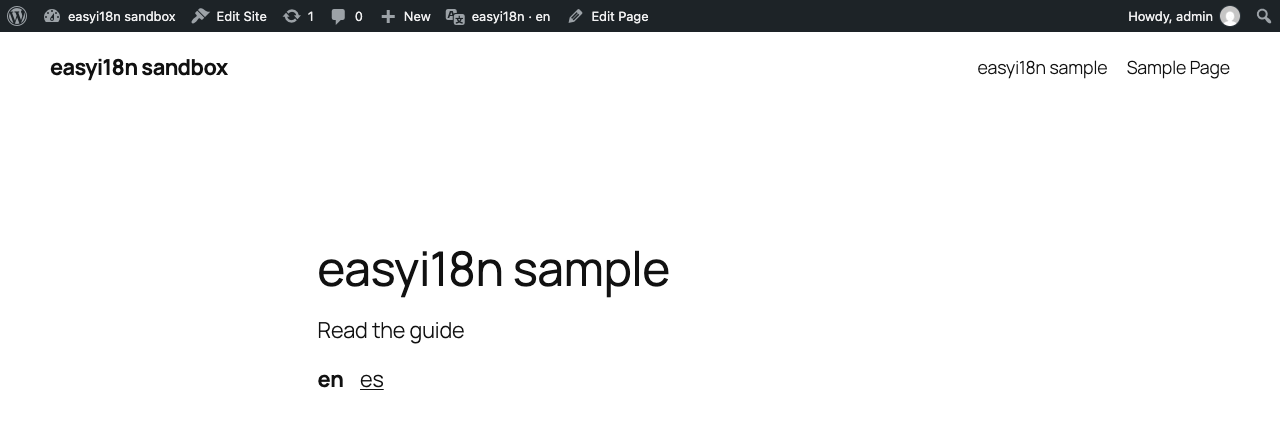
The switcher links to the page the visitor is on in each language. It shows
as a list by default. For a dropdown, set Display as to Dropdown on the block, or use
[easyi18n_switcher display="dropdown"], or pass
array( 'display' => 'dropdown' ) to the template tag.
The label of each language is its code, such as en and es. A developer
changes it with the easyi18n_switcher_label filter:
add_filter( 'easyi18n_switcher_label', function ( $label, $item ) {
    $names = array( 'en' => 'English', 'es' => 'Español' );
    return $names[ $item['tag'] ] ?? $label;
}, 10, 2 );
The switcher prints nothing when the site has no target language, when permalinks are Plain, on a 404 page, and when there is no other language to go to. On a post, it leaves out a language in which the post has no published translation.
On search results the switcher keeps the search. Other query strings are
dropped from its links; easyi18n_switcher_carry_query widens that.
Browser language
Browser language, in the Languages & switcher group of the settings, is off by default. When on, a visitor who opens the home page in a new tab is taken to the language their browser prefers, if the site has it.
- It applies only to the first visit of a tab to the unprefixed home page. A deep link, an address with a prefix or a query string, and the back button keep their page.
- A language the visitor picked in the switcher is remembered in that browser and wins over the browser's preference.
- It runs in the browser, with JavaScript and local storage. Without them the home page stays in the source language. The server sends the same page to everyone.
- It needs Translate content on. The visitor is sent to a language only if every post the home page shows has a published translation in it.
Clear the page cache after changing the setting.
What search engines read
On every public page the plugin prints, in the <head>, one alternate link
for each language and an x-default that points at the source language:
<link rel="canonical" href="https://example.com/es/" />
<link rel="alternate" hreflang="en" href="https://example.com/" />
<link rel="alternate" hreflang="es" href="https://example.com/es/" />
<link rel="alternate" hreflang="x-default" href="https://example.com/" />
A translated page is canonical to itself, so a search engine does not treat
/es/about/ as a copy of /about/.
Pages without a translation
With Translate content on, a post can exist under /es/ before its Spanish
translation is published, or after a publish that left Spanish out. That
address shows the source text. To keep it from being indexed as Spanish, the
plugin then:
- marks the page
noindex; - points its canonical link at the source address;
- leaves that language out of the page's alternate links and of the switcher.
Once the translation is published and the plugin has picked it up, the page is declared like any other. Archives, the home page and other pages that have no document of their own are always declared in every language.
With SEOPress
The title of a translated post reaches the browser tab through WordPress itself. The rest of what an SEO plugin prints has been built for and tested with SEOPress:
- Titles and social tags. The
<title>,og:titleandtwitter:titlethat SEOPress builds from the post title use the translated title. - Hand-written SEO title and description. They travel with the post as part of its document, and their translations are served under the language URL.
- Canonical. SEOPress replaces WordPress's canonical link with its own; the plugin corrects that one.
- XML sitemap. Each entry of SEOPress's sitemap gains its alternate links, and each translated variant gets an entry of its own. A post is listed only in the languages it is translated into.
The plugin does not change the sitemap WordPress generates by itself, and it has no integration with other SEO plugins.
If the theme and an SEO plugin both print Open Graph tags, a share can show the untranslated set. Tools → Site Health reports it as "More than one source writes this site's Open Graph tags"; turn one of the two off.