Theme and plugin strings
The words around your content come from the theme and from plugins: "Read more", "Search", "Leave a comment", the labels of a form. In easyi18n each of them is a key. The plugin finds them as the site renders, sends them to the project and, once you publish their translations, writes the files WordPress loads as native translations.
Switch on a text domain
Themes and plugins label their strings with a text domain, usually the slug of the theme or plugin. The plugin handles only the domains you switch on, so a new site captures nothing.
Open easyi18n → Settings and expand What to translate.
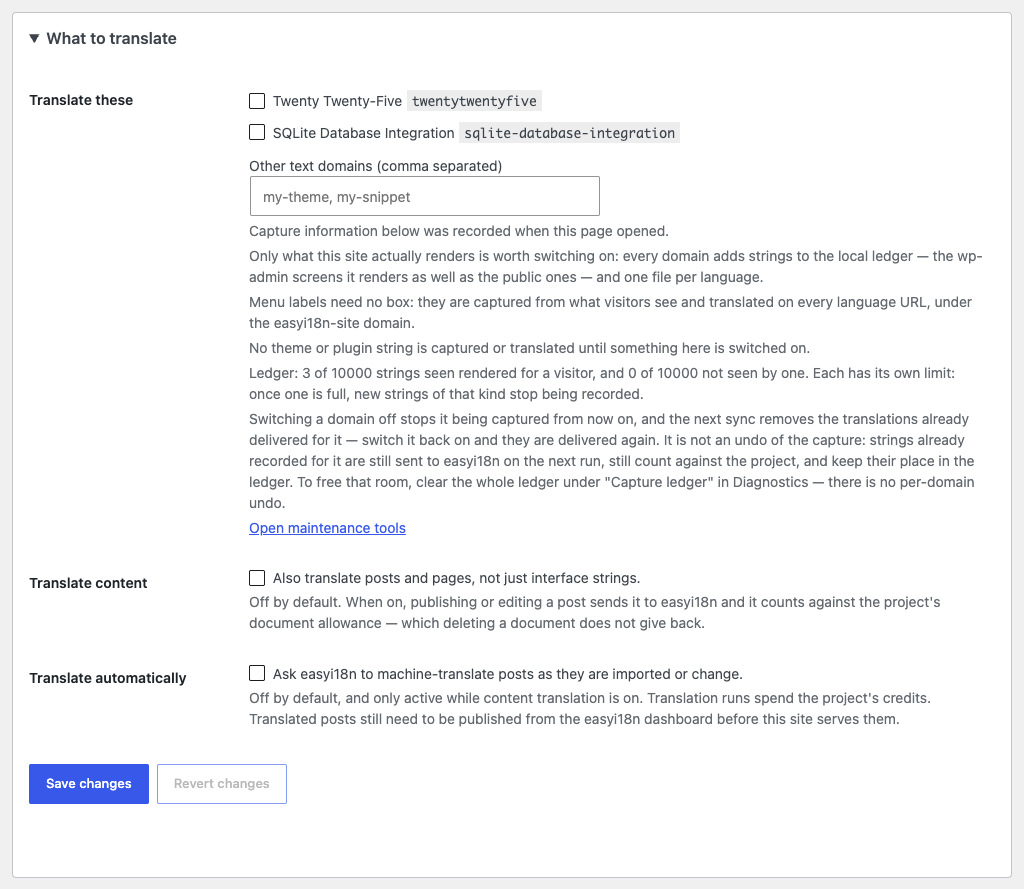
Translate these lists the text domain of the active theme, of its parent theme and of each active plugin. Tick the ones whose text visitors read. For a domain that is not listed, such as one used by a code snippet, type it in Other text domains (comma separated).
Two domains are refused: default, which belongs to WordPress itself, and
easyi18n, the plugin's own. WordPress translates its own strings through
language packs.
Switch on only what the site renders. Every domain adds its strings to the record described below, the ones wp-admin screens show as well as the public ones, and one file for each language.
From the page to the project
When a page renders a string of a managed domain, the plugin records it in a table of the site's database, the capture ledger. Recording does not slow the page down with network calls: the strings of one request are written once, as the request ends.
Every 15 minutes a pass sends the strings the project has not confirmed yet, in batches of up to 200. A project accepts 5,000 new captured keys a day; past that, the rest waits for a later pass.
The ledger holds 10,000 strings that visitors were seen to read and 10,000 that they were not. When one of the two is full, new strings of that kind stop being recorded. The count is under the list of domains and in Diagnostics.
Sending a string does not translate it and spends no credits. Strings arrive in the project as captured keys.
Which strings are sent
A theme's text domain also covers text no visitor reads, such as its options screens in wp-admin. Each string that is sent becomes a key that counts against the project, so the plugin records everything and sends a part of it. Strings to translate, in the Advanced group, decides which part:
| Option | Sends |
|---|---|
| What visitors see | Strings the site's public pages print. This is the default |
| What visitors' requests translate | Strings rendered for anyone who is not signed in: on a page, in a feed, or in an AJAX or REST call, whether or not they are printed |
| Everything | Also wp-admin, the site as signed-in users see it, cron and WP-CLI |
For the first option the plugin has to know what a page prints. It finds out by requesting pages of its own site: the home page, the newest item of each public post type, the most used term of each public taxonomy, a search with results and one without, and an address that does not exist. That is one page for each template. A page is read again after a day. Until a page has been read, the first option sends what the second one would.
Changing the option sends or holds back strings already recorded. Nothing is visited again. A string that is not sent gets no translation, in wp-admin either, unless the project already has it.
Translate and publish
In the dashboard, the captured strings are keys of the project like any other. Translate them with AI or by hand, review them, and publish a version. The site keeps showing the source text until a version that includes the translation is published.
From the project to the site
Every 15 minutes a pass asks the project whether a newer version was
published. If nothing changed, the answer is short and the pass ends. If a
language changed, the plugin downloads it and writes one file for each text
domain and WordPress locale, named {domain}-{locale}.l10n.php, in
wp-content/languages/plugins/. WordPress loads those files the way it loads
any translation, with no work for each string on each request.
easyi18n names a language es, and WordPress names a locale es_ES or
es_MX. The plugin writes a file for each WordPress locale of that language
that the site has installed.
The plugin can only translate a string it has recorded on this site. A key that exists in the project and that the site has not rendered yet is left out until a page shows it.
If the directory is not writable, the pass writes nothing, the site keeps showing the source language and the next pass tries again. Diagnostics reports it on the Translation delivery row.
Three filters adjust this for a developer:
| Filter | Changes |
|---|---|
easyi18n_managed_domains | The list of managed domains. Code can add one or drop one the screen switched on; the screen says which |
easyi18n_lang_dir | The directory the files are written to. WordPress has to be told to load that directory |
easyi18n_wp_locales | The WordPress locales a language is written for |
On a multisite network every site shares wp-content/languages. Two sites
that use different projects for the same text domain and locale overwrite each
other's file unless each points easyi18n_lang_dir at its own directory.
Text that is not in the code
Some text is typed by an editor and stored in the database, so no text domain
covers it. The plugin collects it under a domain of its own,
easyi18n-site, with no box to tick:
- menu labels;
- the site title and tagline;
- names and descriptions of categories, tags and other terms;
- author biographies;
- alt text of images in the media library;
- widget titles, and the body of text and custom HTML widgets;
- text in blocks that render outside the post body, such as a template part of a block theme or a block widget.
These strings are recorded only on pages a visitor loads in the source language, and they are translated only under a language URL. wp-admin always shows what you typed, so editing a menu never saves a translation over it.
A theme or plugin that ships a wpml-config.xml file tells the plugin which
of its options, shortcode attributes and block attributes hold text. The
plugin reads that file and needs no setting for it.
Mark text in a template
Text you write in a header, a footer or a page builder element, outside a block, is invisible to the plugin until you mark it:
[ei]All rights reserved[/ei]
[ei ctx="footer"]Contact us[/ei]
ctx tells two identical texts apart and gives the translator a hint. The
marked text is captured and translated like the strings above.
If another plugin already uses the [ei] shortcode, Site Health says so.
Use the long form, [easyi18n]…[/easyi18n], which works the same.
Switch a domain off
Unticking a domain stops its capture, and the next pass removes the translation files delivered for it. Ticking it again delivers them again.
It does not undo what was captured. Strings already recorded for the domain are still sent to the project on the next pass, still count against it, and keep their place in the ledger. The only way to free that room is to clear the whole ledger.
Page caches
When a pass writes or removes a translation file, the plugin fires the
easyi18n_translations_updated action with the languages that changed. Hook
your cache plugin's purge to it so cached pages pick up the new text:
add_action( 'easyi18n_translations_updated', function ( array $languages ) {
    // Purge the page cache here.
} );
The same action fires when the translation of a post is updated.